Eating out has always been the hardest part of staying on track with nutrition. Restaurant menus, social plans, and last‑minute takeout make logging feel impossible, so most people either guess or stop tracking altogether. Kai’s menu scanning feature changes that by turning any menu into a loggable, filterable list of meals in seconds.
The Problem with Logging Restaurant Meals
Most nutrition apps were built around home cooking and packaged foods, not busy restaurants and cafes. That creates three common problems:
- You do not really know what is in the dish, so you rely on rough guesses.
- Logging takes too long when you have to search and type every item.
- You end up making decisions without a clear view of calories and macros.
Traditional food trackers put all the work on you at the exact moment when you have the least time and attention. Kai’s menu scanning flips that by doing the reading and structuring for you.
How Kai's Menu Scanning Works
Kai’s menu scanning feature turns a paper or digital menu into a list of loggable meals in a few seconds.
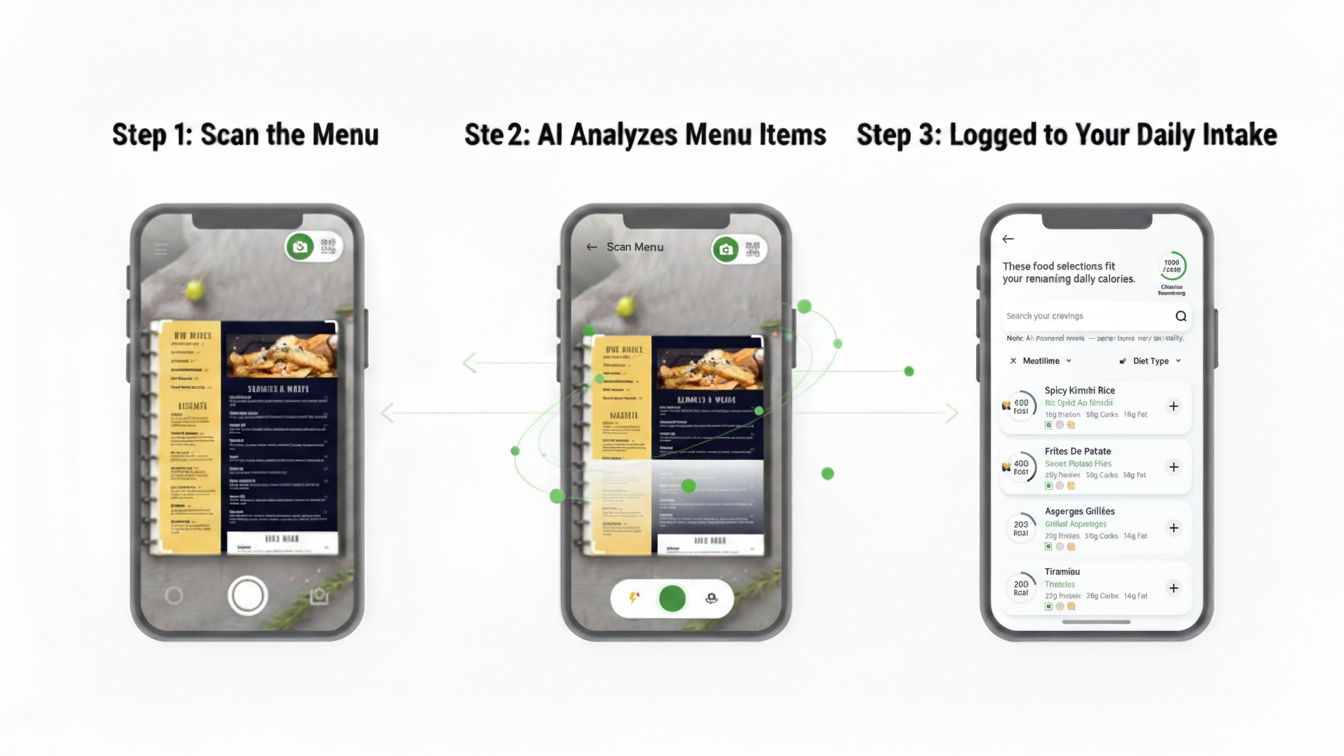
- Step 1: Open Kai, choose Menu Scan, and capture a clear photo of the menu page or a screenshot.
- Step 2: Kai reads the menu text and pulls out the individual dishes as clean, selectable items like “Grilled Chicken Salad,” “Turkey Club Sandwich,” or “Margherita Pizza.”
- Step 3: For each dish, Kai shows an estimated calorie so you can compare options at a glance.
From there, logging is one tap: you pick what you ordered, make quick adjustments if needed, and the meal is logged to your day.
Filter the Menu to Match your Goals
Menu scanning is not just about reading text, It turns the entire menu into something you can work with.
Once Kai has parsed the menu, you can:
- Filter by goal, such as options that better match weight loss, maintenance, or muscle gain targets.
- Filter by macros, so higher‑protein, lower‑carb, or more balanced meals are easier to find.
- Filter by preferences, hiding meals that do not fit your needs, whether that is vegetarian, higher‑fiber, or lower‑fat.
A long, overwhelming menu becomes a short, curated list of meals that support your plan instead of fighting it.
Log Directly from the Menu
Because Kai already understands the menu, logging your meal becomes almost automatic.
- Tap the dish you ordered from the scanned menu.
- Select your portion size and apply any common adjustments, such as extra protein, dressing on the side, or no cheese.
- Kai logs the meal with full calorie and macro estimates and adds it to your day.
No manual searching, no typing, and no reconstructing the dish from memory. For restaurant meals, this reduces logging time from minutes to seconds, similar to how the best AI trackers handle barcode or photo logging for packaged food.
Nutrient Breakdowns that Help you Decide before you Order
Menu scanning is just as useful before you order as it is after you eat.
For each dish, Kai shows:
- Estimated calories
- Protein, carbohydrate, and fat content
Seeing this breakdown makes it much easier to decide what you need to reach your goals. You can quickly spot which meal helps you hit your protein target, which dishes fit into your remaining calories, and how a given choice affects your carb and fat intake for the rest of the day.
That lets you do quick comparisons like:
- Choosing between a Grilled Chicken Salad, Chicken Alfredo, or Cheeseburger when you only have a limited calorie budget left.
- Finding sandwiches or bowls that actually provide enough protein to keep you satisfied.
- Understanding how picking a more indulgent option at lunch will shape what makes sense for dinner.
Instead of guessing, you are making tradeoffs with clear information in front of you.
Why Menu Scanning Changes the Game
Menu scanning directly attacks the friction that usually breaks tracking habits.
- Less effort when you are busiest: social dinners, work lunches, and travel days become some of the easiest meals to log.
- Better decisions in real time: you see the nutritional impact of each option before you commit, not hours later.
Because Kai connects menu scanning with your existing targets and food history, it becomes more powerful over time. The more you scan and log from your favorite spots, the faster future visits become, with your usual meals only a tap away.
📸 Track in Seconds, Not Minutes
Join thousands who’ve discovered effortless nutrition tracking. One photo is all it takes—AI handles the rest.
Get Early Access to Smarter LoggingHow to Start Using Menu Scanning in Kai
- The next time you are handed a printed menu or see a clear menu on your screen, open Kai and use Menu Scan.
- Let Kai turn the menu into a list of options with calories and macros.
- Filter by your goals, pick the meal that fits best, and log it directly from the scanned list.
Once you experience ordering and logging in a single, smooth flow, menu scanning stops feeling like a feature and starts feeling like the way restaurant eating should always have worked.
Frequently Asked Questions
How accurate are the calories and macros from menu scanning?
Kai uses AI and curated nutrition data to estimate calories and macros for each menu item, giving you a solid directional guide even when exact recipes are not disclosed. You can always adjust portions or ingredients if you know something specific about your order.
Can I use menu scanning with any restaurant menu?
Menu scanning works with clear printed menus and most digital menus or screenshots, as long as the text is readable. If a menu is very low quality or heavily stylized, you can still log items manually.
What if I customize my order (no sauce, add protein, etc.)?
After scanning, you select your dish and then adjust it by changing portion size or common modifications like removing cheese or adding extra protein. Kai updates the calorie and macro estimates to reflect those changes.
Does menu scanning work for takeout and delivery apps?
Yes, you can scan a clear screenshot of a menu from delivery or takeout apps, then log your meal directly from the parsed list of items. This keeps your logging flow the same whether you are dining in or ordering in.
Is menu scanning only for people trying to lose weight?
No. Menu scanning helps whether your goal is fat loss, maintenance, or muscle gain by showing calories, protein, carbs, and fats for each item so you can pick meals that align with your current targets.