Making better food decisions is not just about what is in your kitchen. It is also about the choices you make when you are scrolling delivery apps, grabbing lunch between meetings, or saying yes to last‑minute dinner plans. Kai’s Meal Discovery features help you find meals that fit your goals in those moments, without turning every meal into a tracking project.
Why eating out derails most nutrition plans
Most nutrition apps were built around home cooking and packaged foods, not busy restaurants and cafes. That creates predictable problems when you eat out:
- Menus are long and vague, so you rely on rough guesses.
- Nutrition info, if it exists, is buried or incomplete.
- Logging takes too long, so you skip it “just this once” and lose the habit.
Kai changes this by focusing less on restaurant logos and more on specific meals that actually fit your goals.
Meal-first discovery: see dishes, not just restaurants
When you open many apps, you are greeted with a wall of restaurant names. Kai flips this by surfacing meals first. Instead of starting with “Where should I eat?”, you are guided toward options like:
- Higher‑protein meals available near you
- Meals that sit roughly within your remaining calories for lunch
- Balanced options within a short distance that better match your targets
Behind the scenes, this is similar to how newer AI tools label dishes with nutrition estimates so people can filter by health criteria. In Kai, that intelligence is packaged into a simple, meal‑first experience that feels natural when you are hungry and short on time.
Separate views for meals and restaurants
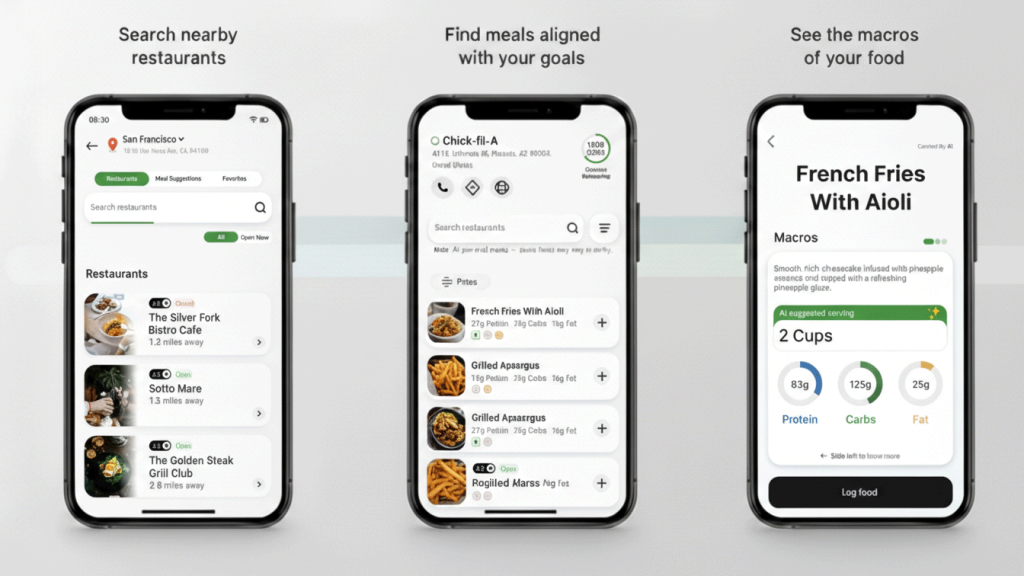
Sometimes you care about what to eat, and sometimes you already know where you are going. Kai supports both with two clear views:
- Meals view: Browse individual dishes that match your goals across multiple nearby places.
- Restaurants view: Choose a specific restaurant and then see recommended dishes from that location that align with your targets.
This separation keeps the app straightforward. If you want inspiration, you stay in Meals. If you already picked a spot with friends, Restaurant view helps you turn that menu into something you can actually work with.
See macros for each dish at a glance
A dish name alone does not tell you much. To make a better decision, you need to know what is inside it.
For each discovered dish, Kai shows:
- Estimated calories
- Protein
- Carbohydrate
- Fat
With these numbers in front of you, you can:
- Quickly find meals that help you hit your protein target.
- Choose dishes that fit the calories you have left for the day.
- Balance carbs and fats across your remaining meals instead of guessing.
Instead of hoping a salad is “healthy,” you see exactly how it compares to a sandwich, bowl, or burger in concrete terms.
Log directly from the dish you chose
Discovery is only half the battle; the other half is logging what you actually ate. Kai connects both in one smooth flow.
Once you find the dish you plan to eat, you can:
- Tap that dish directly from the list.
- Adjust how much you actually had by changing the portion size or number of servings.
- Save it to your log so it counts toward your daily calories and macros.
There is no need to search again, rebuild the meal from scratch, or switch between different parts of the app. Similar discover‑and‑log flows have been linked to better adherence, because they reduce the time and effort required to track each meal.
Why this matters for real results
Restaurant meals, takeout, and coffee‑shop food are where most nutrition plans quietly fall apart. By making nearby options visible, understandable, and directly loggable, Kai:
- Reduces the friction that usually leads to “I will just not log this one.”
- Helps you see tradeoffs clearly instead of relying on guesses.
- Makes it realistic to stay on track even with a busy, social lifestyle.
You can keep saying yes to dinners, lunches, and last‑minute plans without feeling like you are starting from zero every Monday.
Frequently Asked Questions
How does Kai decide which restaurant meals to show me?
Kai uses your goals, calorie budget, and macro targets to surface meals from nearby restaurants that are more likely to fit your plan, rather than just listing everything available.
Can I still use Kai if my favorite restaurant does not publish full nutrition information?
Yes. Kai estimates calories and macros for many common restaurant dishes using menu descriptions and nutrition data models, so you still get a useful breakdown even when exact values are not listed.
What if the portion I eat is different from the default serving size?
When you choose a dish, you can adjust the amount you actually ate by changing the portion size or number of servings before logging it, so your diary reflects your real intake.
Does Meal Discovery only work for people trying to lose weight?
No. You can use it for fat loss, maintenance, or muscle gain, because Kai filters and highlights meals based on your current calorie and macro targets, not just “low calorie” options.
Do I have to log in a separate screen after I pick a meal?
No. Once you find a dish that fits your goals, you tap it, adjust the portion if needed, and log it directly from the same flow, without searching again or rebuilding the meal manually.